From Tokens to GPUs: Controlling Enterprise AI Costs with Nutanix Agent Gateway
If someone in your organization is building AI models, what affects the cost, and how can cost predictability be achieved?”
How AI usage actually drives cost
1. Usage starts with tokens. A token is a small chunk of text, roughly three-quarters of a word. With API-based AI services, token usage translates directly into cost. With a private model, there may be no per-token invoice, but those tokens still consume GPU capacity and processing time.
2. Model choice is a big multiplier. A large frontier model can cost an order of magnitude or more per token than a small one. Many tasks that are useful in an enterprise, such as classifying a ticket, summarizing a log or pulling fields out of a form, don’t need the biggest model.
3. Agents multiply everything. A chatbot makes one call per question. An agent makes many: it plans, calls a tool, reads the result, thinks again and calls another tool. Each step re-sends a growing context. One user request can become 10, 20 or 50 model calls. A retry loop or a badly scoped task can burn through tokens during background tasks.
4. The importance of the harness. A model on its own takes text in and sends text out. The agent harness is the software wrapped around it that turns it into an agent. It holds the instructions, tells the model which tools it can use, runs the tool calls, feeds the results back, decides what history to keep in the context, and decides when to stop.
For cost, the harness is where many of the biggest decisions live, and they’re developer decisions:
- How many steps an agent may take before it must stop
- How much context is re-sent on every call: the full history, or a trimmed summary
- Retry behavior when a tool call fails
- Which model handles each step: one big model for everything, or a smaller one for the simple steps
Two harnesses using the same model for the same task can differ in cost several times over. That’s why tokens per task, measured at the gateway, is such a useful number: it shows the result of all those harness choices.
So cost isn’t set buying the GPUs or signing an API contract. It’s influenced every day by the developer who picks the model, writes the prompt and decides how the agent loops.
Training vs. inference: two very different cost profiles
AI costs fall into two categories, and they behave differently.
Training is how a model is built. It means feeding a huge amount of data through a large GPU cluster for weeks or months. It’s very expensive and, for most enterprises, avoidable.
What enterprises do in practice:
- Fine-tuning: adapting an existing model with your own data. It’s a scaled-down version of training: a significant but bounded GPU burst, measured in hours or days, that runs occasionally.
- Inference: using the model: every question asked, every summary produced, and every agent step.. This is where your money goes, and it is a recurring cost.
| Training / fine-tuning | Inference | |
|---|---|---|
| When | Project-based, occasional | Continuous, 24/7 |
| Cost shape | Large, one-off GPU burst | Small per request, potentially enormous at scale |
| Who drives it | Data science team | Every developer, app and agent |
| How to control it | Project budget | Model choice, quotas, routing, and right-sizing |
The takeaway for understanding cost: inference is the long-term cost line, and it’s driven by decisions spread across many teams. To make spend predictable, visibility is needed at the point and time of use.
On-premises, inference cost shows up primarily as GPU capacity consumption: how many GPUs a model requires, how efficiently they are utilized, how much concurrency they support, and how often expensive capacity sits idle
What problem does an Agent Gateway solve?

There are various ways organizations use AI today but we will focus on running a private model on-premises, pulled from Hugging Face’s public repository of open models.
An Agent Gateway is a single control point between your agents and apps on one side, and the models and tools they use on the other. Every request goes through it. Nutanix Agent Gateway is part of Nutanix Enterprise AI and provides:
- One endpoint for public and private models, so apps call the gateway rather than each provider directly
- Token tracking per team, user or agent, so usage is assigned to an owner
- Consumption quotas and token-based rate limits, so budgets are enforced, not just reported
- MCP server governance: access policies and tool-level filtering for which agents can use which tools
Putting data in the decision path
Most cost tools are after the fact. You get a report, find the overspend, and try to understand who is responsible and what happened. By then, the money is spent and, to some extent, the opportunity to influence developer choices has been lost.
A gateway moves cost data into the decision path:
- Developers see token usage for their own agent while building it, not at month end. “This agent uses 40K tokens per task. Could a smaller model handle step 3?” becomes a normal engineering conversation.
- Platform teams set quotas and limits before a runaway agent becomes a showstopper. An alert at 80% of expected use prompts a conversation, and a hard stop at 100% keeps the problem contained.
- Finance and leadership finance and leadership get showback by team, creating a basis for asking the real question: what does this agent cost per useful outcome?
The gateway doesn’t make cost decisions for anyone. It makes sure the people deciding have the data when they can still change the outcome.
Running private AI models on Nutanix infrastructure
While pulling down a private model and deploying on-premises doesn’t have a per-token invoice. GPUs and other resources are consumed, as is the engineers’ time, and there is a possible supply chain risk to consider.
Nutanix Enterprise AI allows you to connect directly to Hugging Face repository to import models
There are two categories of models, and the difference matters for both cost and risk.
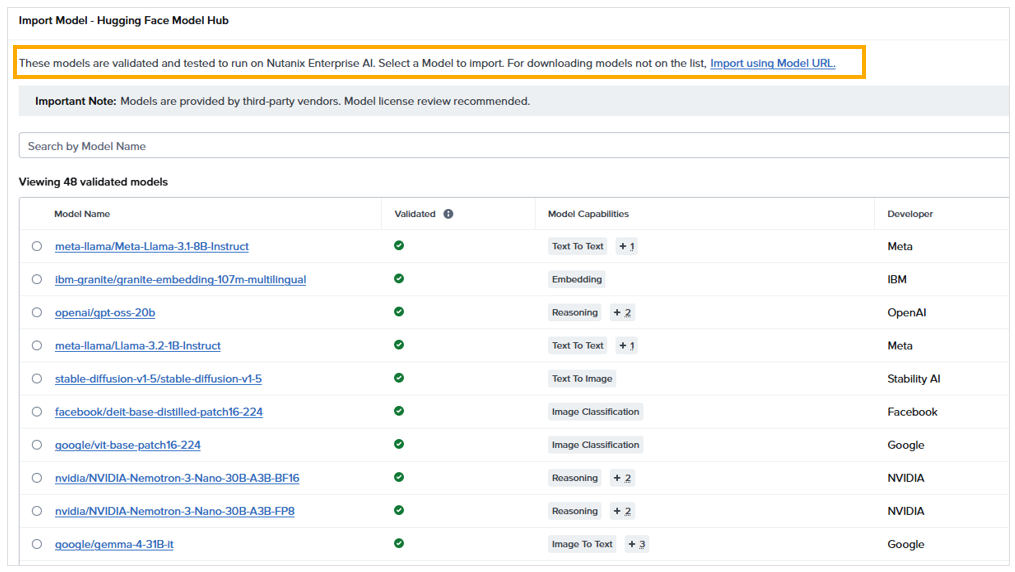
Category 1: Nutanix-validated models
These models have been tested and pre-validated by Nutanix to run on the platform. What that gives you:
- Lower supply chain risk. A model file is software. Public hubs can host tampered weights, files that run code when they’re loaded, or models with unclear licensing. Using a model that has already been validated cuts down on what you’re trusting blindly.
- Known GPU and resource requirements. You know before you deploy how many GPUs it needs, what type, and how much memory. You can plan capacity and cost before you spend.
- Predictable deployment. It’s known to work, so you’re not troubleshooting at 2am.
Category 2: Non-validated models
You can also pull other models from Hugging Face. That flexibility is real and valuable: a new model, a specialized model for your industry, or one your data scientists need to test.
But you take on the work Nutanix would otherwise have done:
- No pre-validation: the model hasn’t been tested on the platform.
- No published GPU or resource requirements: you have to work out sizing yourself.
- A higher chance of failure: if you size it wrong, the deployment fails or performs poorly.
Why this is a cost conversation, not just a technical one
A model’s size is one of the main factors determining how much GPU memory it requires. A rough rule of thumb is parameters × bytes per parameter. A 7-billion-parameter model at standard 16-bit precision needs about 14 GB of GPU memory for its weights alone. A 70-billion-parameter model needs about 140 GB for its weights alone, potentially requiring multiple GPUs, with additional memory needed for inference workloads, context and concurrency.
Get that wrong with a non-validated model and the costs pile up quickly:
- Undersized: the deployment fails, an engineer spends a day troubleshooting, and the project slips.
- Oversized: expensive GPUs are reserved for a model that needed half of them, and they stay reserved indefinitely.
- Trial and error: every failed attempt ties up GPU capacity that other teams could have used.
A validated model gives you the resource requirements before you commit GPUs, so the decision is made with data rather than by trial and error.
Who needs a gateway?
You probably need one if any of these are true:
- More than one team is building with LLMs or agents
- You use both public AI APIs and private models
- Teams are pulling open models from Hugging Face to run on-premises
- Agents are, or soon will be, connecting to internal tools and data via MCP
- Someone has already asked, “Why is our AI bill so high?” and nobody could answer
- You have security or compliance rules on where data can go and who can reach it
If you have a single team running one proof of concept, you can probably wait. Plan for it before the second or third team arrives, though. Adding governance after the fact is always harder.
What does it take to set up?
At a high level, adopting the gateway involves:
- The platform: Agent Gateway ships with Nutanix Enterprise AI (GA in 2.7; MCP server management went GA in 2.8). If you already run Enterprise AI, you have the foundation.
- Choose your models: start with Nutanix-validated models where possible, so GPU sizing is known up front. Use non-validated Hugging Face models deliberately, in a sandbox first.
- Register your models: your private models served on Nutanix, plus any external providers. Provider API keys live at the gateway, not in every app’s config.
- Define your consumers: teams, users and agents, each with their own access and identity.
- Set policy: quotas, rate limits and which MCP servers and tools each consumer can reach.
- Repoint apps: developers send requests to the gateway endpoint instead of directly to providers.
- Review the data: usage by consumer becomes your showback report and the start of your FinOps conversations.
The technology is the easy part. The real work is agreeing on who owns which budget and what a sensible quota is. Start by watching usage without enforcing limits, learn the patterns, then set limits.
The bottom line
AI agent costs are shaped by many small decisions made by developers and platform teams every day: which model to use, where it comes from, how much GPU capacity it receives, and how the agent loops. You can’t govern what you can’t see, and you can’t change a decision after it’s made. An Agent Gateway, together with validated models that come with known resource requirements, puts usage and cost data where the decisions happen. For infrastructure teams it’s a chance to be the people who enable AI safely and affordably, not the people asked to explain the bill.
Views are my own.
tags: [FinOps, AI, Nutanix, Tokenomics, AgenticAI, PlatformEngineering, HuggingFace]